

At Sinay, we build AI-powered solutions for the maritime industry. Our platform helps offshore construction contractors monitor marine environments, get insights on fishing activities, and ensure compliance with strict environmental regulations. AI is central to our mission – we process thousands of videos daily to detect marine mammals and blur faces for privacy compliance.
As our video processing demands have grown – from occasional batches to thousands of videos arriving every day – our infrastructure needs have evolved significantly. We need systems that can:
- Process thousands of videos daily, each requiring 20 minutes to 2 hours of GPU time
- Autoscale to handle variable loads throughout the day
- Keep infrastructure complexity low
For Sinay, the ability to process large volumes of data reliably is a core business requirement, not a technical optimization. Our customers operate industrial and national-scale monitoring programs, where scalability and consistency matter more than one-off performance.
The Challenges of Scaling Video Processing Infrastructure
As our video processing volumes grew, so did the complexity of our infrastructure. What started as a manageable pipeline became increasingly difficult to scale and maintain.
Multi-Region GPU Orchestration Was Complex and Time-Consuming
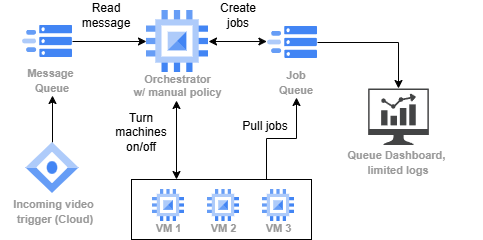
Sinay’s video processing pipeline before SkyPilot. New videos trigger an orchestrator that creates jobs, and GPU workers pull from the queue.
Our video processing pipeline required multiple components to manage. When a new video arrives in our GCS bucket, a trigger adds it to a message queue. An orchestrator service consumes these messages and creates jobs in a jobr queue. Workers then pull jobs from the queue and process videos using our AI models for tasks like face blurring and activity detection.
Setting up this infrastructure for a large production pipeline takes significant time. But the real pain came when we needed to run ad-hoc batch jobs – and GPUs weren’t always available in our preferred region. We needed a tool that looks for available accelerators in European regions.
“For a production pipeline that runs for a long time, setting up a job controller, orchestrator, and workers is acceptable. But it becomes tedious for one-shot tasks—like processing 500 videos to benchmark a new algorithm. Between configuring the orchestrator, provisioning machines, and testing, you’re looking at about 3 hours before you process a single video.”
– Jacques Everwyn, AI Engineer @ Sinay
GPU availability across regions was unpredictable. When we needed to spin up 10-15 T4 GPUs for a batch job, they weren’t always available in our preferred region. We’d have to manually check multiple (European) regions, adjust our scripts, and hope capacity freed up – often waiting 30 minutes or more before retrying.
Preemptions of spot instances required manual coordination. We used spot instances to reduce costs, but jobs were killed when the provider preempted a machine. We needed to investigate our logs to find which video to manually add again to the queue, and had to create a new machine to replace the one that disappeared.
Debugging Failures Was Difficult
With our custom orchestration setup, debugging job failures was a nightmare. When a video processing job failed, we had to manually trace which job ran on which machine, SSH into the correct VM, and dig through logs to find the root cause.
Was it a missing source video? Out of memory? A corrupted frame? Each debugging session required detective work to connect the dots between our queue, orchestrator, and workers.
Cloud Provider Lock-in Concerns
We were running exclusively on GCP Compute Engine across multiple European regions to minimize egress costs. While GCP worked well, we worried about being locked into a single provider. Solutions like Vertex AI or SageMaker would deepen that lock-in and add significant cost overhead for our use case.
We needed flexibility to potentially move workloads to other clouds or even on-premises servers without rewriting our entire pipeline.
How SkyPilot Transformed Our Video Processing
Simple GPU Job Management with SkyPilot Pools
SkyPilot’s Pool feature replaced our entire manual orchestration stack with a simple, unified interface – reducing ad-hoc batch setup from 3 hours to 30 minutes – a 6x improvement.
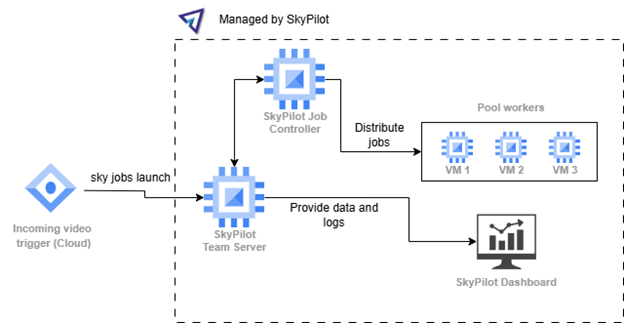
GPU batch inference simplified with SkyPilot Pools. Videos trigger job submissions directly to a SkyPilot Pool. Workers automatically pull and process jobs, with built-in autoscaling and multi-region support.
One YAML to define everything. Instead of maintaining separate configurations for our orchestrator, queue, and workers, we now define our entire processing setup as a SkyPilot Pool:
					pool:
  workers: 5

resources:
  accelerators: V100:1
  use_spot: true
  instance_type: n4-standard-8
  any_of: # European low CO2 regions on GCP
    - infra: gcp/europe-west1
    - infra: gcp/europe-west2
    - infra: gcp/europe-west3
    - infra: gcp/europe-west4
    - infra: gcp/europe-west6

workdir: .

envs:
  GITLAB_USER: <TOKEN_NAME>

secrets:
  GITLAB_TOKEN: null

file_mounts:
  ~/sky_workdir/weights/model.pth: ./weights/model.pth

setup: |
  echo ${GITLAB_TOKEN} | sudo docker login registry.gitlab.com -u ${GITLAB_USER} --password-stdin
  sudo docker pull registry.gitlab.com/path/to/image:version
And we submit jobs directly to these pools:
					resources:
  accelerators: {V100: 0.5}

run: |

  # Setup the environment
  JOB_FOLDER=job_$SKYPILOT_TASK_ID
  sudo mkdir -p ./data/${JOB_FOLDER}
  sudo mkdir -p ./results/${JOB_FOLDER}

  # Download data
  gsutil cp "${VIDEO_PATH}/${VIDEO_NAME}" "./data/${JOB_FOLDER}/${VIDEO_NAME}"

  # Run the Docker
  docker run --rm --gpus all -i -v "./weights:/app/weights" -v "./results/${JOB_FOLDER}:/app/output" -v "./data/${JOB_FOLDER}:/app/data" path/to/image:version --argument1 value1

  gsutil cp -r ./results/${JOB_FOLDER}/ "${OUTPUT_PATH}"

  # Clean up
  sudo rm -r ./data/${JOB_FOLDER}
  sudo rm -r ./results/${JOB_FOLDER}
Model loading happens once, not per job. With SkyPilot Pools, our Docker container with the AI model stays running on the machine. New jobs reuse the already-loaded model, avoiding the expensive model initialization on every video.
Submitting jobs is trivial. Instead of managing two queues, we submit jobs with a simple bash script that iterates over video folders:
					for folder in /videos/*/; do
  sky jobs launch -y video_job.yaml \
    --env VIDEO_PATH="$folder" \
    --env VIDEO_NAME="$video_name"
    --env INPUT_BUCKET=<INPUT_BUCKET> \
    --env OUTPUT_BUCKET=<OUTPUT_BUCKET>
done
Debugging Made Easy with the Dashboard
The SkyPilot dashboard provides complete visibility into every job:
- Which video is being processed by which worker
- Full VM logs accessible directly from the job entry
- Clear error messages when jobs fail (missing file, OOM, etc.)
“With our old setup, it was difficult to know which video was handled by which job, or which machine to look at for debugging. With SkyPilot, I can access the VM logs directly from the job entry and immediately see if a job failed because it couldn’t find the source video or because the machine ran out of memory.”
– Jacques Everwyn, AI Engineer @ Sinay
Debugging time: hours -> minutes. What used to require tracing failures across queue, orchestrator, and workers – often taking hours of investigation – is now diagnosed directly from the dashboard with full VM logs in minutes.

Up to 62% lower costs through intelligent multi-region scheduling
SkyPilot automatically optimizes our infrastructure costs in several ways:
Region-aware scheduling. SkyPilot finds the cheapest machines as close as possible to our GCS bucket region, reducing both compute costs and egress fees. We operate across multiple European regions, and SkyPilot intelligently places workloads to minimize total cost.
Fully managed spot instances. We run our video processing on spot instances, reducing our compute costs by 62% compared to reserved instances. You can use them without SkyPilot, but it handles the complexity of spot instance management automatically (find cheapest instances, job retry when the machine is preempted, etc).
Multi-cloud flexibility. While we currently use GCP, SkyPilot gives us the freedom to add other cloud providers without changing our job definitions. If we have capacity issues or find better pricing elsewhere, switching is just a configuration change—not a rewrite.
“Using SkyPilot reduces our dependency on a single cloud provider. If we have issues in the future, we can switch providers without changing much in the codebase. It’s a more flexible option compared to solutions like Vertex AI or SageMaker.”
– Jacques Everwyn, AI Engineer @ Sinay
Interactive Development with SSH and VSCode
Beyond batch processing, we use SkyPilot to manage development workstations. sky launch gives us instant SSH access to GPU machines for experimentation, model debugging, and development. We connect directly through VSCode’s remote SSH, making it feel like local development but with cloud GPU power.
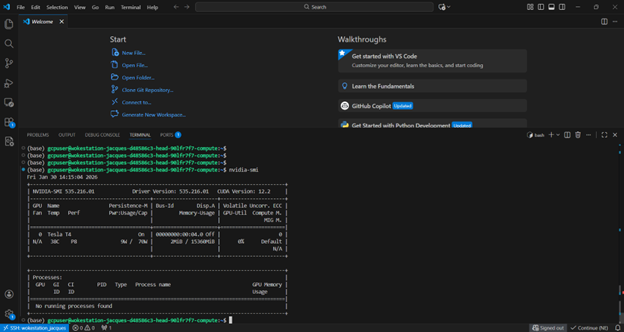
VSCode’s connected to remote VM through SSH
Results: Simplified batch inference infra with 62% lower costs
SkyPilot transformed how we handle AI infrastructure at Sinay:
- 62% cost savings via intelligent scheduling: Spot instances combined with region-aware scheduling near our GCS buckets significantly reduced our compute and egress costs – all without manual tuning.
- Thousands of videos daily: SkyPilot’s automation lets our team handle enterprise-scale video processing workloads without dedicated infrastructure engineers.
- Engineers save hours: One-shot benchmarking tasks that used to require 3 hours of orchestration setup and testing now launch in 30 minutes with a single sky jobs launch command – freeing engineers to focus on model development instead of infrastructure.
- Debugging in minutes, not hours: Job failures that required tracing across the queue, orchestrator, and workers are now diagnosed directly from the dashboard with full logs.
- Cloud flexibility without lock-in: We maintain the option to expand to other clouds or on-premises infrastructure as our needs evolve – something we’re actively exploring with new GPU servers.
As volumes increased, the challenge was no longer just about running jobs, but about maintaining reliability and cost control at scale without growing the team or adding operational risk. SkyPilot enabled us to execute this operating model at scale, turning large-volume AI processing into a repeatable, reliable capability rather than an infrastructure bottleneck.